

Microsoft Office 2019 Professional Plus is one of the most sought-after Office suites, and it can be downloaded from Microsoft's official website. Before installing Office, make sure your device meets the minimum system requirements. With a valid product key, you can activate Office 2019 Pro Plus and use it permanently with a one-off perpetual licence. If you are looking for clear instructions to download, install and activate it, you are in the right place. This guide walks you through the complete process to download, install and activate Office 2019 Professional Plus.
Office 2019 Professional Plus at a glance
Microsoft Office 2019 Pro Plus has become one of the most widely used office suites thanks to its well-rounded set of features. This robust collection of applications is a core part of many people's daily work. Whether it is office work or homework, Microsoft Office has the tools to get the job done. Features such as richer visual impact, easy task linking and at-a-glance progress tracking help you become more productive and creative day after day. For everyday tasks at the office, at home and at school, Office 2019 Pro Plus is a solid choice. Please note that Office 2019 no longer receives security updates from Microsoft, so for long-term use a newer version such as Office 2024 is recommended.
How to download Microsoft Office 2019 Professional Plus
Downloading Office 2019 Pro Plus is quite straightforward. Follow the steps below to download the Office 2019 Pro software to your device:
- First, go to setup.office.com
- Sign in with your Microsoft account

- If you do not have a Microsoft account yet, create a new one.
- Enter your valid Office 2019 Pro Plus licence key and click Next
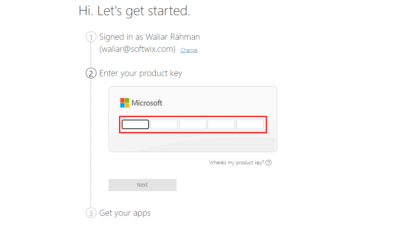
- Finally, download your Office Pro Plus 2019 ISO file
Note: If you do not have a valid licence key yet, you can download the ISO file directly below.
How to install Office 2019 Professional Plus
Microsoft Office is an advanced application, so your device's hardware and software must meet some essential system requirements. If your device meets the requirements listed further down, you can install the software easily. Here is the installation procedure:
To start the installation, locate the ISO file you downloaded.
- Right-click the ISO file and choose Mount.
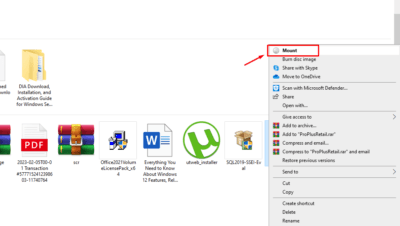
- Open the mounted drive and look for a file named Setup.exe in that folder.
- Run setup.exe to start the installation straight away.
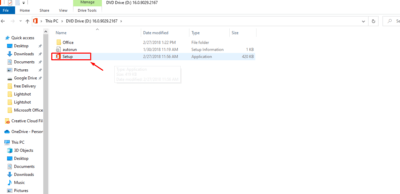
- Follow the on-screen instructions to continue the installation
- When the installation is complete, a new window appears on screen.
- Simply close the window and the installation is finished.
Why do you need a valid licence key to activate Office Pro Plus 2019?
An Office product key is a 25-character code in the format XXXXX-XXXXX-XXXXX-XXXXX-XXXXX. Activating your Office suite with a valid product key unlocks the full range of features and confirms that your copy is genuine. Activation with a valid product key is therefore essential if you want to get the most out of Microsoft Office 2019 Pro Plus. In short, to ensure optimal productivity and access to every feature of these applications, make sure you activate your Office suite with a valid product key.
Note: If you do not have a valid licence key for Microsoft Office 2019 Pro Plus, you can buy one from our shop at a competitive price.
How to activate Office Pro Plus 2019
Once Office 2019 Pro Plus is installed on your device, you can activate it easily by following these steps:
- First, open any Microsoft Office 2019 application, such as Word or Excel.
- Click the "File" tab in the top-left corner of the screen.
- Select "Account" from the options listed at the bottom left of the screen.
- Find the "Product Information" section and click "Change Product Key".
- Enter the 25-character product key in the field and press Enter.
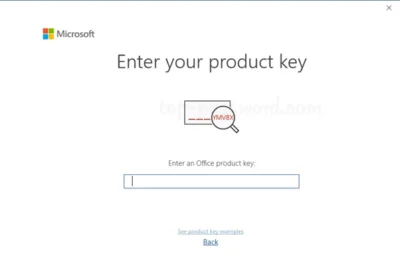
- If your product key is valid, you will see the Activate Office button; click it.
Congratulations! You have successfully activated Office 2019 Pro Plus on your device. You can now enjoy all the features and benefits of the complete suite of applications.
Office 2019 Professional Plus minimum system requirements
Here are the minimum system requirements for Microsoft Office 2019 Pro Plus on your device. Let's take a look at the full list:
- Client operating system: Windows 10, 11, Windows Server 2016, 2019 and 2022.
- Processor: minimum speed of 1 GHz (gigahertz).
- Minimum RAM: at least 4 GB of RAM.
- Minimum disk space: at least 4 GB of free space.
- Graphics card: DirectX 9 or later
- Display: minimum 1280 x 768.
- Internet connection: a reliable broadband connection
- Account: a Microsoft account.
Summary
Downloading, installing and activating Office 2019 Professional Plus is simple. Your device needs to meet the basic system requirements and you need a genuine licence key. By following these instructions, you will have this popular office suite installed on your computer, ready to help with all your daily tasks at the office, at home or at university.