

Microsoft Office 2019 Home and Student is a popular office suite among home users and students, and you can download it from Microsoft's official website. To install Office on your device, it must meet the minimum system requirements. With a genuine Home and Student licence key, you can activate and use Microsoft Office 2019 Home and Student on your computer for life.
If you are not sure how the download, installation and activation process works, you are in the right place. In this guide, we walk you through the complete process to download, install and activate Office 2019 Home and Student.
Note: Microsoft support for Office 2019 ended on 14 October 2025, so it no longer receives security updates. The software keeps working with a perpetual licence.
Overview of Microsoft Office 2019 Home and Student
Microsoft Office 2019 Home and Student has become one of the most widely used office suites among students and home users thanks to its practical features. This productivity suite includes Word, Excel and PowerPoint, and it remains a go-to tool for completing personal and academic projects.
Whether you work at home or at school, this version of Microsoft Office covers everything you need to get the job done. With features such as Translator to break down language barriers, LaTeX equation support, new Excel functions, an improved reading experience and the ability to insert icons and SVG graphics, you can work more productively and creatively. Office 2019 Home and Student is a great choice for home and academic tasks.
How to download Microsoft Office 2019 Home and Student
Downloading Office 2019 Home and Student is quite simple. You can quickly download the software to your device by following these steps:
- First, go to setup.office.com.
- On the next screen, sign in with your Microsoft account.
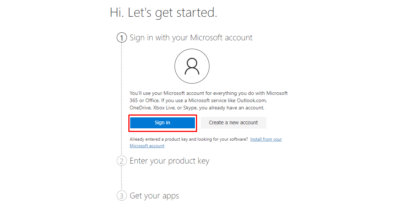
- If you do not have a Microsoft account yet, create a new one.
- Then copy and paste your genuine Office 2019 Home and Student licence key and click Next.
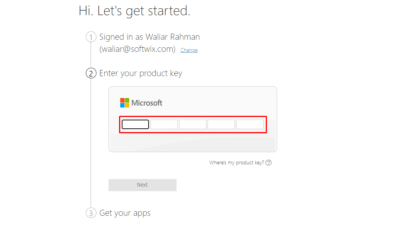
- In the Get your apps section, you can download the Office Home and Student 2019 installation file.
Note: if you do not have a licence key yet, you can still download the installation image directly below.
Download the Office 2019 Home and Student ISO file
How to install the Office 2019 Home and Student ISO file
As Office is an advanced application, your device's hardware and software must meet a few basic system requirements. If your device meets them, you can install the software quickly. Here is the installation procedure:
- To start the installation, go to the downloaded installation file on your device.
- To mount the image, right-click the file and select Mount.
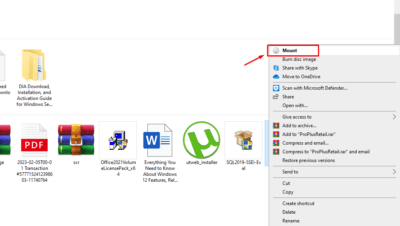
- A new virtual drive is created on your PC and opens.
- Double-click Setup.exe to start the installation straight away.
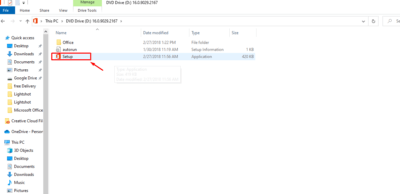
- Follow the on-screen instructions to complete the installation.
- A new window may appear asking you to enter your Office 2019 Home and Student licence key.
- You can simply close that window and finish the installation; you will activate Office in the next step.
Microsoft Office 2019 Home and Student: a practical set of essential apps
Word, Excel and PowerPoint come with a host of new features, and each app offers a wide range of powerful tools. However, so-called free keys found online are often invalid, blocked or limited in time, and without a genuine product key your access to Office features is restricted, which ultimately affects your productivity. To avoid these limitations, activate Microsoft Office with a genuine product key.
An Office product key is a 25-character code that looks like this: XXXXX-XXXXX-XXXXX-XXXXX-XXXXX. Once your Office suite is activated with a valid product key, it activates directly with Microsoft's servers and you get full access to every feature of Office 2019 Home and Student. If you want maximum productivity and access to all the features of these programs, make sure you activate your Office Home and Student 2019 suite with a valid product key.
Note: if you do not yet have a valid Microsoft Office licence key, browse our Office licence keys with instant delivery by email.
How to activate Office 2019 Home and Student
Once Office 2019 Home and Student is installed on your device, you can activate the suite by following the steps below:
- To begin, open one of the Microsoft Office 2019 apps, such as Word or Excel.
- Then go to the top left of the screen and select the File tab.
- Choose Account at the bottom left of the screen.
- Find the Product Information section and select Change Product Key.
- Enter your 25-character product key in the field, then press Enter.
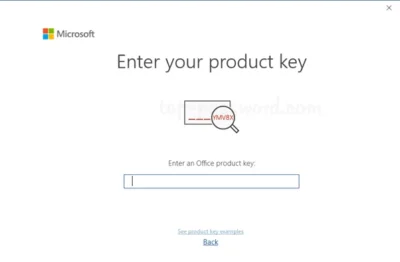
- If the product key you entered is valid, you will be able to click the Activate Office button.
Congratulations! You have successfully activated Microsoft Office 2019 Home and Student on your device. You can now enjoy all the features of the full set of Office apps.
Microsoft Office 2019 minimum system requirements
Here are the minimum system requirements for Microsoft Office 2019 Home and Student on your device:
- Operating system: Windows 10, Windows 11, Windows Server 2016, 2019 and 2022.
- Processor: 1.6 GHz or faster, 2 cores.
- RAM: 4 GB minimum (64-bit); 2 GB (32-bit).
- Disk space: at least 4 GB of free space.
- Graphics: DirectX 9 or later.
- Display: 1280 x 768 minimum.
- Connection: a broadband Internet connection
- Account: a Microsoft account.
Conclusion
Downloading Office 2019 Home and Student is straightforward, as long as your hardware meets the minimum system requirements and you have a genuine licence key. By following the steps above, you can install Office 2019 Home and Student on your computer and get everyday tasks done easily at work, at home or at school.